Archived Content from Web3Auth Community
This topic was originally posted by zkyeshuoer on 9/6/2024.
This content has been migrated from our previous community forum to preserve valuable discussions.
-
SDK Version:8.1.1
-
Platform: Web
-
Browser Console Screenshots:
-
Verifier Name: jwks-jwt
-
JWKS Endpoint: https://the-wallet-protocol-poc-422ad9d857ec.herokuapp.com/jwks.json
-
Sample idToken (JWT): “eyJhbGciOiJSUzI1NiIsInR5cCI6IkpXVCIsImtpZCI6Inh4eCJ9.eyJzdWIiOiIzZDE3ZTU5Yi0xOTBhLTRlMjAtOWNhMC0yMGI3MDkwYzc0YjIiLCJuYW1lIjoidGVzdDRAYWJjLmNvbSIsImVtYWlsIjoidGVzdDRAYWJjLmNvbSIsImlzcyI6InZhc3R3YWxsZXQiLCJpYXQiOjE3MjU2MzgwMjEsImV4cCI6MTcyNTY0MTYyMX0.ydWloH-IgaLBUSIpQr4vzhT0AFxiOi6RKLzxFN5gvi52X4DVC_AdVl-_ZGRYDiwf-MbyFK4mrm3YB5PiF-PKx7tJw_ht-_5TkHJ4-j_K516K7dd-CULctVV4IjDYdfKcdzPhoNusJpC-P0wZr_FaRM6dDR-KZ6r-_joyEUcAvmOK9zHyThNnZr8uOA9eCr8sgKi0_2CqkGNiTN8IXbFOKToE3tRE9fgwgu2XNE71EEjTmCfcAy_J32UG4DDwgXo-OAnotxYr0qQNDvguPldYz_ViG4u-168j7zDl6Zxbibii2h81ErW_aw0Mvoa315GrAxOyDrWSm7uKn93a76-0bw”
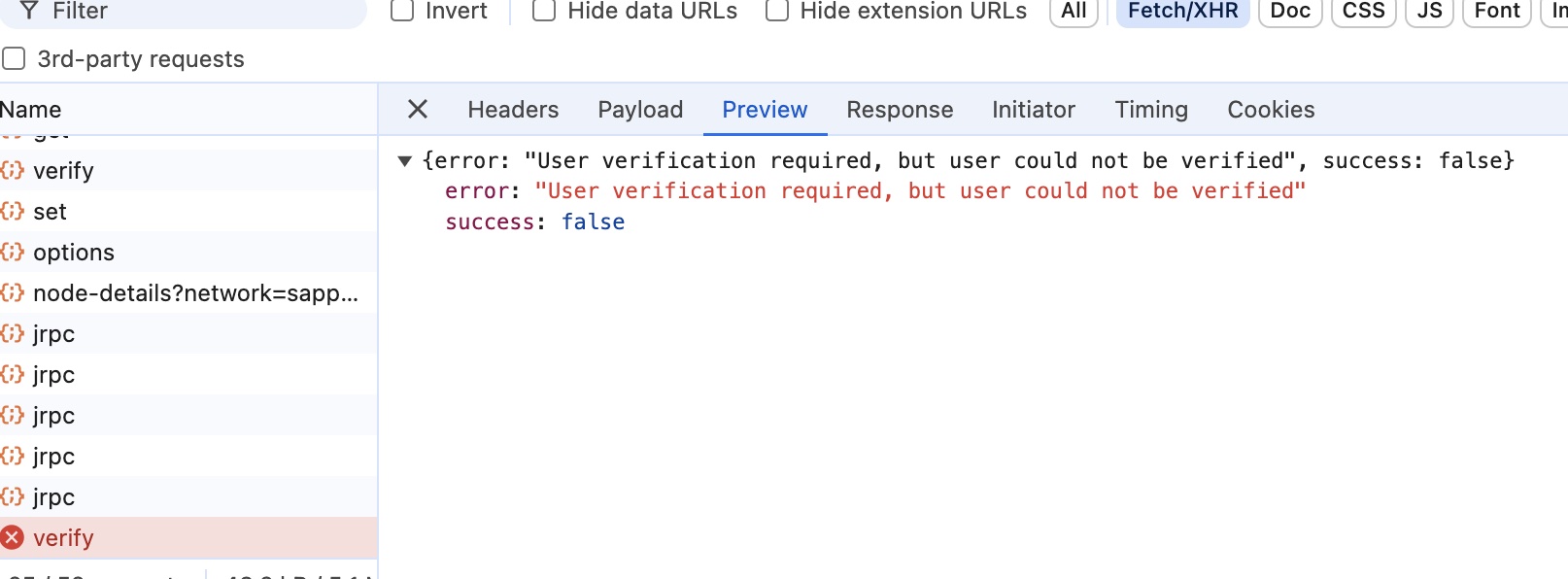
I am using Custom JWT Verifier and Passkeys Plugin. After clicking the signup button, I successfully logged in. Then, when I click register passkey, the browser pops up a passkey window. After completing the setup, this error appears: User verification required, but user could not be verified."
here is the front end page
// page.tsx const passkeysPlugin = new PasskeysPlugin({ rpID: "localhost", rpName: "localhosttest", });const chainConfig = {
chainId: “0xaa36a7”,
displayName: “Sepolia Testnet ETH”,
chainNamespace: CHAIN_NAMESPACES.EIP155,
tickerName: “Sepolia Testnet ETH”,
ticker: “ETH”,
decimals: 18,
rpcTarget: “https://rpc.ankr.com/eth_sepolia”,
blockExplorerUrl: “https://sepolia.etherscan.io”,
};const privateKeyProvider = new EthereumPrivateKeyProvider({
config: { chainConfig },
});// Initialising Web3Auth Single Factor Auth SDK
const web3authSfa = new Web3Auth({
clientId, // Get your Client ID from Web3Auth Dashboard
web3AuthNetwork: WEB3AUTH_NETWORK.SAPPHIRE_DEVNET, // [“cyan”, “testnet”]
usePnPKey: false, // Setting this to true returns the same key as PnP Web SDK, By default, this SDK returns CoreKitKey.
privateKeyProvider,
});web3authSfa.addPlugin(passkeysPlugin);
function App() {
const [isLoggingIn, setIsLoggingIn] = useState(false);
const [isLoggedIn, setIsLoggedIn] = useState(false);
const [email, setEmail] = useState(‘test2@abc.com’);useEffect(() => {
const init = async () => {
try {
web3authSfa.init();
log(‘init’)
} catch (error) {
console.error(error);
}
};init();}, );
const getIdToken = async () => {
// Get ID Token from server
const res = await fetch(“http://localhost:5001/api/token”, {
method: “POST”,
headers: {
“Content-Type”: “application/json”,
},
body: JSON.stringify({ email })
});
const data = await res.json();
return data?.token;
};const signUp = async () => {
setIsLoggingIn(true);
const idTokenResult = await getIdToken();const { payload } = decodeToken(idTokenResult); log('payload', payload) const provider = await web3authSfa?.connect({ verifier, verifierId: (payload as any).email, idToken: idTokenResult, }); log('provider', provider) setIsLoggingIn(false); setIsLoggedIn(true);}
async function registerPasskey() {
try {
log(‘email’, email)
const res = await passkeysPlugin.registerPasskey({
username: email,
});
console.log(“Passkey registered successfully”, res);
} catch (error) {
console.error(“Error registering passkey:”, error);
}
}async function loginWithPasskey() {
try {
const user = await passkeysPlugin.loginWithPasskey({
// authenticatorId: authenticatorId,
});
console.log(“User logged in successfully:”, user);
} catch (error) {
console.error(“Error logging in with passkey:”, error);
}
}const loginView = (
<div>
login
<Button onClick={registerPasskey}>register passkey</Button>
<Button onClick={loginWithPasskey}>login with passkey</Button>
</div>
)const logoutView = (
<div className=“bg-red-200 w-1/2 mx-auto”>
<Input
value={email}
onChange={(e) => setEmail(e.target.value)}
/>
<Button onClick={signUp}>sign up</Button>
</div>
)
return (
<div className=“”>
{isLoggingIn ? <LogoLoading /> : <div className=“”>{web3authSfa ? (isLoggedIn ? loginView : logoutView) : null}</div>}
</div>
);
}
here is the token generation api
.post('/api/token', (req: any, res: any) => { const email = req.body.email console.log('email', email)const privateKeyBase64 = process.env.PRIVATE_KEY_BASE64! const privateKey = Buffer.from(privateKeyBase64, 'base64').toString('ascii') const token = jwt.sign( { sub: uuidv4(), // must be unique to each user name: email, email: email, // aud: "urn:my-resource-server", // -> to be used in Custom Authentication as JWT Field iss: "vastwallet", // -> to be used in Custom Authentication as JWT Field iat: Math.floor(Date.now() / 1000), exp: Math.floor(Date.now() / 1000) + 60 * 60, }, privateKey, { algorithm: "RS256", keyid: "xxx" } // <-- This has to be present in the JWKS endpoint. ); res.status(200).json({ token });
 ,
,