kenton
October 26, 2023, 3:03pm
1
This topic was originally posted by kenton on 10/26/2023.
Please provide the following details too when asking for help in this category:
Not sure which params are invalid, if any.
Please provide the Web3Auth initialization and login code snippet below:
func setup() async {
guard web3Auth == nil else { return }
await MainActor.run(body: {
isLoading = true
navigationTitle = "Loading"
})
web3Auth = await Web3Auth(.init(
clientId: clientId,
network: network,
loginConfig: [TypeOfLogin.jwt.rawValue:
.init(
verifier: "ghosty-adventures",
typeOfLogin: .jwt
)]))
await MainActor.run(body: {
if self.web3Auth?.state != nil {
user = web3Auth?.state
loggedIn = true
}
isLoading = false
navigationTitle = loggedIn ? "UserInfo" : "SignIn"
})
}
func loginViaFirebaseEP() {
let result = try await web3Auth?.login(
W3ALoginParams(
loginProvider: .JWT,
dappShare: nil,
extraLoginOptions: ExtraLoginOptions(display: nil, prompt: nil, max_age: nil, ui_locales: nil, id_token_hint: nil, id_token: id_token, login_hint: nil, acr_values: nil, scope: nil, audience: nil, connection: nil, domain: nil, client_id: nil, redirect_uri: nil, leeway: nil, verifierIdField: "sub", isVerifierIdCaseSensitive: nil),
mfaLevel: .NONE,
curve: .SECP256K1
))
await MainActor.run(body: {
user = result
loggedIn = true
})
} catch {
print("Error \(error)")
}
}
}
kenton
October 26, 2023, 6:07pm
2
Here are the params being sent:
clientId : "BN8LcaHGfXTJ6KsbirnW65Fn6nmVw83jS5k0K_QOx7XOmRMMWBInUr2fFIjRGFRiykAscFMXw9InHcVqWRZG9uw"
  - network : Web3Auth.Network.testnet
  ▿ sdkUrl : https://dev-sdk.openlogin.com
    - _url : https://dev-sdk.openlogin.com
  - redirectUrl : nil
  ▿ loginConfig : Optional<Dictionary<String, W3ALoginConfig>>
    ▿ some : 1 element
      ▿ 0 : 2 elements
        - key : "jwt"
        ▿ value : W3ALoginConfig
          - verifier : "ghosty-adventures"
          - typeOfLogin : Web3Auth.TypeOfLogin.jwt
          - name : nil
          - description : nil
          - clientId : nil
          - verifierSubIdentifier : nil
          - logoHover : nil
          - logoLight : nil
          - logoDark : nil
          - mainOption : nil
          - showOnModal : nil
          - showOnDesktop : nil
          - showOnMobile : nil
  - whiteLabel : nil
  ▿ chainNamespace : Optional<ChainNamespace>
    - some : Web3Auth.ChainNamespace.eip555
  ▿ useCoreKitKey : Optional<Bool>
W3ALoginParams
  - loginProvider : "jwt"
  - dappShare : nil
  ▿ extraLoginOptions : Optional<ExtraLoginOptions>
    ▿ some : ExtraLoginOptions
      - display : nil
      - prompt : nil
      - max_age : nil
      - ui_locales : nil
      - id_token_hint : nil
      ▿ id_token : Optional<String>
        - some : "eyJhbGciOiJSUzI1NiIsImtpZCI6IjAzZDA3YmJjM2Q3NWM2OTQyNzUxMGY2MTc0ZWIyZjE2NTQ3ZDRhN2QiLCJ0eXAiOiJKV1QifQ.eyJpc3MiOiJodHRwczovL3NlY3VyZXRva2VuLmdvb2dsZS5jb20vZ2hvc3R5LXMtYWR2ZW50dXJlcyIsImF1ZCI6Imdob3N0eS1zLWFkdmVudHVyZXMiLCJhdXRoX3RpbWUiOjE2OTgzNDI5NDEsInVzZXJfaWQiOiJzbEJrZERoSEVxUFByU05BVzJ4ZmVhT2dybnYxIiwic3ViIjoic2xCa2REaEhFcVBQclNOQVcyeGZlYU9ncm52MSIsImlhdCI6MTY5ODM0Mjk0MSwiZXhwIjoxNjk4MzQ2NTQxLCJlbWFpbCI6ImN1c3RvbStpZF90b2tlbkBmaXJlYmFzZS5sb2dpbiIsImVtYWlsX3ZlcmlmaWVkIjpmYWxzZSwiZmlyZWJhc2UiOnsiaWRlbnRpdGllcyI6eyJlbWFpbCI6WyJjdXN0b20raWRfdG9rZW5AZmlyZWJhc2UubG9naW4iXX0sInNpZ25faW5fcHJvdmlkZXIiOiJwYXNzd29yZCJ9fQ.ZBHS-5mVBVyv2Kz3VF2ltPueMDYUhF8v1ncEgQYqC-LVLQIrkSYNgIaba5160qNFqS4K4c9sXfrjyu-CjrRASBdbNOPYuWqqDh5LAFO9eI5uYy6l8x-YfyK4T3xrWpbOQgoCOCrtPnO8G0AYwetauEQA73yMpZXUkTjjVLQdPCe1gdyyDDgUyViXVOAKa74-rFj9Q5zTvEBzoBR5efBILHpIJGPiROq6dl9Fqk0XX4k7apGdsCKwg3HKJeNR_YNnwKmPwRCp8kHo30x5mbCNLvNIPh1R7UHZlXlPzH_-JgRltvbKKb6q5WCt_YVmGwSBavoPHH7TAykC1RMJ8oMjNg"
      - login_hint : nil
      - acr_values : nil
      - scope : nil
      - audience : nil
      - connection : nil
      - domain : nil
      - client_id : nil
      - redirect_uri : nil
      - leeway : nil
      ▿ verifierIdField : Optional<String>
        - some : "sub"
      - isVerifierIdCaseSensitive : nil
  - redirectUrl : nil
  - appState : nil
  ▿ mfaLevel : Optional<MFALevel>
    - some : Web3Auth.MFALevel.NONE
  - sessionTime : 86400
  - curve : Web3Auth.SUPPORTED_KEY_CURVES.SECP256K1
vjgee
October 27, 2023, 1:08am
3
@kenton Welcome Aboard!
Your request has been forwarded to our Dev team and we will get back with further updates.
kenton
November 9, 2023, 3:59pm
4
Thanks for the warm welcome @vjgee ! Has there been any movement with this issue?
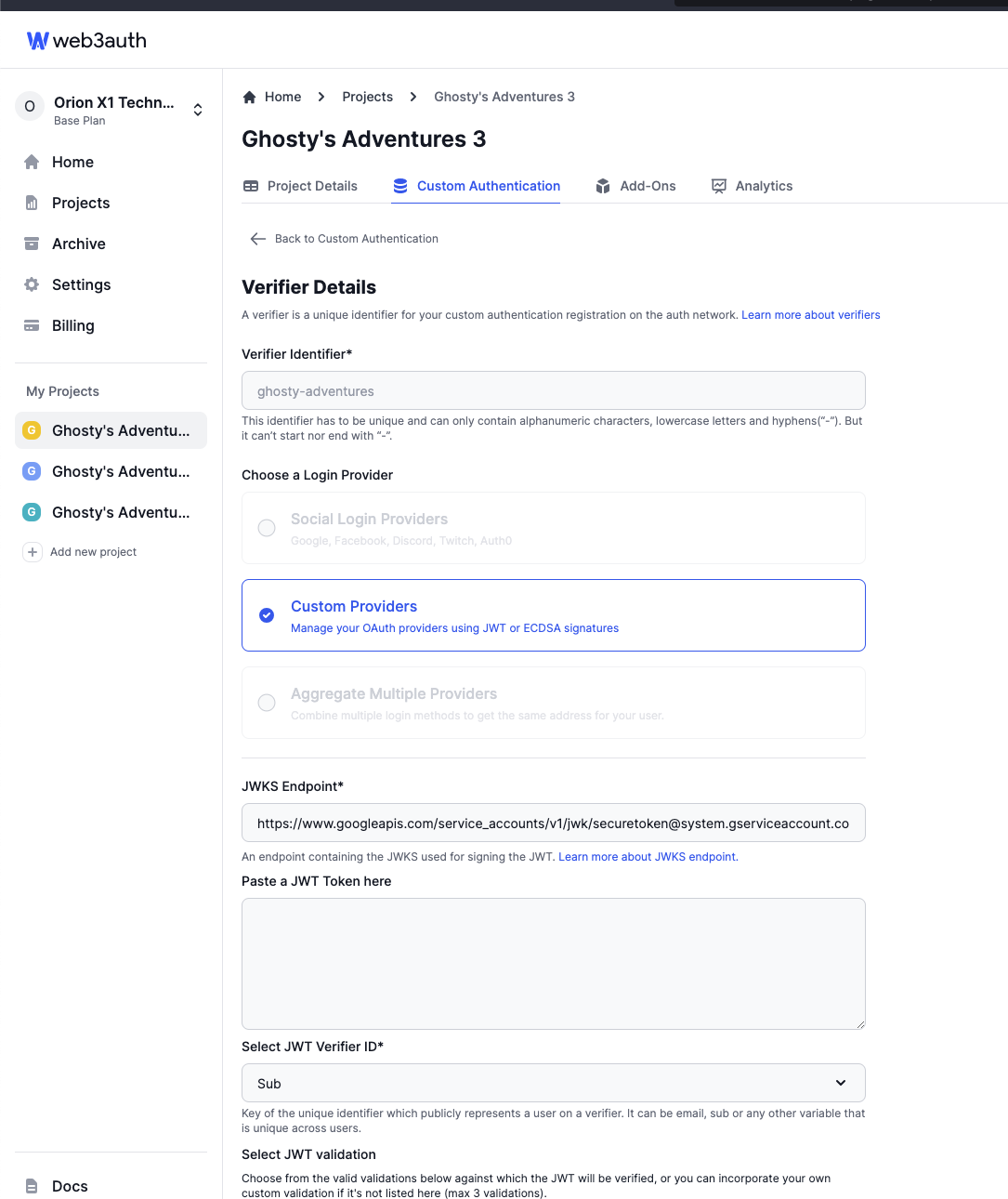
Hey @kenton , can you check if verifier ghosty-adventures is linked to any project or not?
kenton
November 10, 2023, 12:41pm
6
Hey @maharshi
There are two things I would request you to do and let me know if that fixes this issue for you.
kenton
November 14, 2023, 2:52am
8
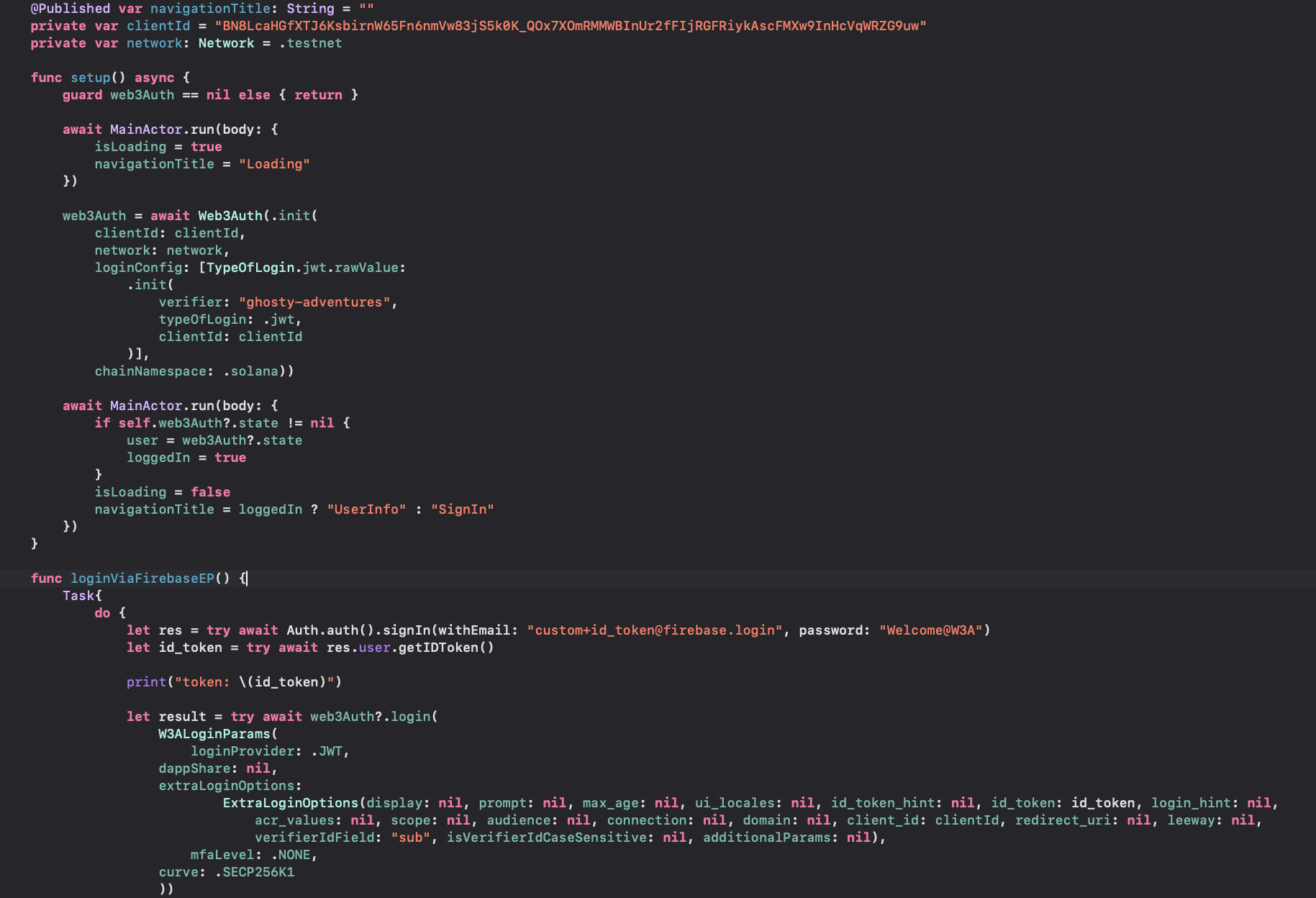
@maharshi In the image below you can see that I’ve added the clientId to the ExtraLoginOptions and to the init of the loginConfig.
I’m now, after authenticating the user, the authentication modal dismisses and I get an “unknown error” printed in the console as well as some other stuff, I’ll copy below for you:
authrorize session response is: {
    message = "data saved successfully.";
    success = 1;
}
authrorize session response is: Optional(["message": "{\"iv\":\"6294f2e2d5f278997687761c2bc28a58\",\"ephemPublicKey\":\"04d23d3303ffa2fb98c1663d92f85fa76afe0c531db24eeea5e14a5fa31f8946d3173a7b42c0a6b42c965df027cdb0820604b29e3c90f94ecee58bca8663605e5e\",\"ciphertext\":\"5c6a51252c2567394a76395e5d63635e485a10d9965c4287a5ccae130698e04767fbf698c14c29578d240fcd8803676f46c476ee76a28a09ed9b2a85c5ffeceedcf68e287074c05a74d48721bf4919c28136fde95eb6c548f3909957a54c14e52b51c2e546ef0aa96ef02b43eef31752710b5d8fafe2f69fc525682c90b303ec94a8a21fd77f6ba7cda51aafb6f895bd5023313677f73192d7680d1f8f8736e24f7083443dc8881119b66b3d5572de4eeb4bc2ec97c65fac37603c9107d7ae28f8247a38a00f36391d2065ee396b5944287cb4786a6809eaf8dd1b217faf1a25a6bf4966253abd1edadc9f02755952cb80eee58a3d689e2758c375b27bb7b46d9905af57455cc7c108167bacb622873dc17ba1cf74a58dc387826314c7a8b8af08b79f803b9e6f47732632e6a9a674231b946a428488cdbbe270b38fe0264de506dad4e70d7ec876d21037c3d6516d5fecbacaa963ec2a0921263194df34b09962b23b8492fc345a5b4b3412081ad86020111bc6c6602948a4d5996448f9ed0edf0abd562b0dad24af5676058c26f5e92320fb3c62035969c617ce372cc41f313a2d5e9bb2b3a6ff8c3c77eb2fea1f907cf66a333c241adfe64f6e99e19ea2344a4fc8bd9c1eac70bebff99ef9e0d1621e0fb41e415eedb1de8b06c9d1705bf7ce0f74c08d1d9c2fd881799211419c1754dde4dde73dbf2864cc7cb9112f83aa7be67cedb5788fcff078b135ee693c354d9b30620be66e19c2e55b74533e4f3b7f1cbac081ac823035fcb99bf35cff234c066c47f4389176f2b5e876d77a4781e47dee5ccfd81f4db4528aa84df55a1ac4d58befc2da877847c0e42509fe9afa5ba229d1eab85a96f2a6209deb756187ec2c4a4a66a41efca6ecb0cd232f52798d0c608ca34d5ee687348c510cba20571376eb6bad7c859cc4c0afdd7e162e069d162d09c7e9fc5cbec0a560c48af25b1e6b5efcd3f37196c9433722a473815841cb3200681c48881d12c715a2b7acf2bfd8f5b1c1a767b993c8da01b7719109645cd6ba9f3ab3c3a5d761746381ad17b9b6c19a383e818fbde627a459d1beac0dec4c94e7873eabb6adddc7578b449f1ac7b465b6d797639dd35ac025619581c13e7e4cd94fc1998bf4bd76e34f589b034326ef0ec9465c8fab7569c426a7518eeb73d0cc1b811cf57bb6699d96c7dd82b936314a795f093f9c008a8062f113a6e416ae9c7483823c11547b4ed53c947e05617465875bfeb00fa9be778c4a67ad5208edb06f0909d0016c7a2974a103165ecfcb0f27346413242a472465375e56ec15985fb1a32aa883f35bb4d835aa538cded858d7af7a5329947a54b78d48e093ba0fa9310a589c353b4555ce3d9ba444770aea210e8a4e3a0d81100cd8797baa0fec6dfc48417bab7301ed6429c7fc561b3914aa56eb48f47a558ae6f48b12dc50f14d549d8cc8d0122e8c1d340725c6ed328fdf25b2a817c7c90a4e51922f0ea189dce20be0e8eb1d2f849ae8b74b4c6ec4f311ae1a3a2dc7fe7fc1361bd3aa566310930d64f7af58d8e59deb858a1a078e0e64f4a9d68d181ee38d3657cf9e266364e5b7ec4254074d198e3f01ae91451b2a8389321f8d103556482c4e9d5f964e38f37d48c71d0cb85f735b16878470300ff636af1d8276a90e9bf58c39e0050e6d3f09ef6c9f87c8a3b601c158ecc5b5cf0b8bbb9855e70971236dcaab1b6571087c50621b5df389b999f4170fc646a4f54828e4d50176cbe40c545600a77bc1e3bcca32a21c0a04107604fef8bb3c4c13f2436ab4e5528829385e2ccf168d7a46420af415f3b8975d5be761f15b26c5eadab14e3dfcadd083f1e6e415d55d6a9bd5e20aa27275de2392ae5da2b330da3e36635768e66cbf2c1756c33fe0bcee57ef7435701fadb753d26b8705d86155ebbb2deefe4f762f338c1cb536a542e41c19c57dab0cafe82c09db1661522e64488121bf49254674fb7f9ebd508cf66f29248af84c2a05a2b6d068947183e212526cddc404c20108c41387031bec1fcf7db837a35c836f0c533883ce6e7c65b5b434e2fbbfe4617c1885e6b9515494b0e048fb668774ac8c7cd4c30a5ee7e9581a533e63803f3199a0b2cdd7f1760e939383e9c12f1193e816052f9b26660747a7a59040b8ae7903c187325c5986a8154e55c2383bf8b10d28ac923e2ad88bf7ad6d020a2409f9055b959d035cff853065fbaae0b3a4ea4de5beb6852f738e85ebc1d144ab066a070c81be1db56c674b5d78b18a41fc46bc6c8463386f085cf24296375bb7b02c8111ea86aefb8ad7cfc5283a55efe9abd7cbdb62b078b077311ceff98da9a67230cd13ccb169165e1a1b93686fa2963d3bcff7e92b56aa85844a080fd83fb2c96af3b27278e10557616910b77f9b0b2192764e9ef8720253da07bee57d37863f1e7ba2286e481946646271c63a4b8e409b7ea358a7ab2dacad0bc57ad1403e90b6a30159b3293824fca64b8a4a6f0dea154898583ebe7f2c492c6e67b10639020bdef425268a4a464d18604489679ee126ed470b013831be222ed7f14662d280e7bf92adc11e57cc93707b47169d39d37a4abd69fc742d03ca5d24ec4183805b7e9d1f2bb8d726b243b9b668078142aece4cd96a71b41bf1de755922b8c98b2e5f852afcb712738db98085d9c893e9a209323378bfda76ae7ab0f85b441b3f6f69f8f7d9e2d8d38084ad7d3224a8646d2718b136b85908bb08dd1c3233a6d68e0e5701acbdd28d2d4c7ee14d56db725bb5abf5e0e180e4b2a9d97c2e0e45ad6c5b4e63ac075010694fc82f12d77ef226f8097b273915b70b24047ff73246042a0226487dee3297463ef371ba765851b50c30d8a27da059b247b0882ef77c430d8039e0240ea7845e5b52481f3fcf6be4a0da27fbe0db0d5c2dcadc6d8b28c5a836d882c4e624601bf7e262eba8300e3d9fcbf4d7f55bf548d7d4b1a7a5c7429f6bf3c9df414ed8ccb63639d942251453998fb80667d170baa8ef81e2c201b7e624a2a6c35d4bfc38b95c4cacd6ba8ed882185e23ffc35d5d60ac22f7f92416a3af53fc9095de0543d7bf135ce0fdbabb06824f676dc18ff4df8f8a081dd5aa05600374d202eb24d685bda0983e7b4e4aed4f32df2295620221c6aca57c1311126cad51b8898a2c1175a10837c90fb1e8d499486d535c803a994e0245cb18b18b92d6b10224210232a351c3d038c046ff03ec0509a3a8c40fb1221b2d4cea37e4558e8c7eea201d0def38b6fb58bb0a4920df0c835c89c140f75ac2b4c718ad31742ccc1b11572f61f604f5387765c6fc0d934f279e7729511f41f44fc40b3b521f063f2b55dad5b9999e06f1d23bfc09f08c44dedf43141d4c0a487c2f0140abe8b47c093e8bfb62bf897e7ebb9b8730aaf8331523f12aa39bf87717023af58210c98732aaec43ccefe7de92ad8563e3857635bc01a57d4215989debaf2be7dd33c3a6a8d1d6198f7f5de085efe86a56f83ddee6b0d36719983bc826fd7b8c3726e5d6390a011fb59c609e1a70bb03a5e8f1ea535c6e57213b899671b6305355c114bf53df8d3863ee7c12becab028bfff78f7e506de4588c42573a2a30476872b77c2a8e42decb2fe79d8848de64d7d82e2fd0718a54f7597d074a5806fcce3b593be24e2e468f767ef803397490cdf9ff1382286f8b0b3d1da6bb028e791571bc60738fe021d38edc5b714578796773311550fda8feaada0b6e837f1016a7001213a9d38af37ba36c7b656e727040111185ab793d1f4b89ba998b7af8257d503b89bbc25893716a6989c74e492cf90d8ba9a519275784c9d2440710964f76ae65164038d4c67fdc678ad02def13ea47eb53960b9781c5845f22ca5b6ece240303fba3ea913d914e3901db19997fa85e1ded78452babe87475abfe8d84946ffa930aef5b5d2b8bb6b6519dab1d6295a8bb65e94d8034c08f3a90187826481407d4e99598e\",\"mac\":\"82767c8f2d19c5ab13a4043ffa76e3de895e754815a07d55d0032e463b4d4946\"}"])
Error unknownError
kenton
November 19, 2023, 12:24am
9
@maharshi I’ve also updated to the latest sdk version.
shahbaz
November 21, 2023, 5:26am
10
Hey @kenton
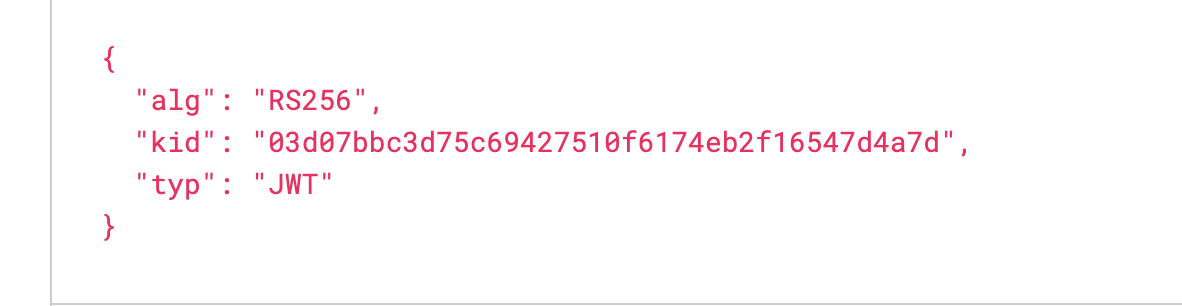
The id_token you have shared has a different kid value than what’s present in the JWKS endpoint .
May I know how you are generating the idToken?
kenton
November 21, 2023, 12:21pm
11
@shahbaz I’m pulling it out of the signIn function.
If you go one screenshot up (in the previous reply) you’ll see what I’m talking about.
kenton
November 25, 2023, 12:04am
12
@shahbaz I set it up almost exactly like the example y’all provide in GitHub for SwiftUI
shahbaz
November 27, 2023, 4:20am
13
Did you create custom+id_token@firebase.login to your firebase dashboard? Also, I am keen to understand how the kid is different and how did you setup the firebase auth.
kenton
November 29, 2023, 3:37pm
14
shahbaz:
Did you create custom+id_token@firebase.login to your firebase dashboard?
What do you mean exactly?
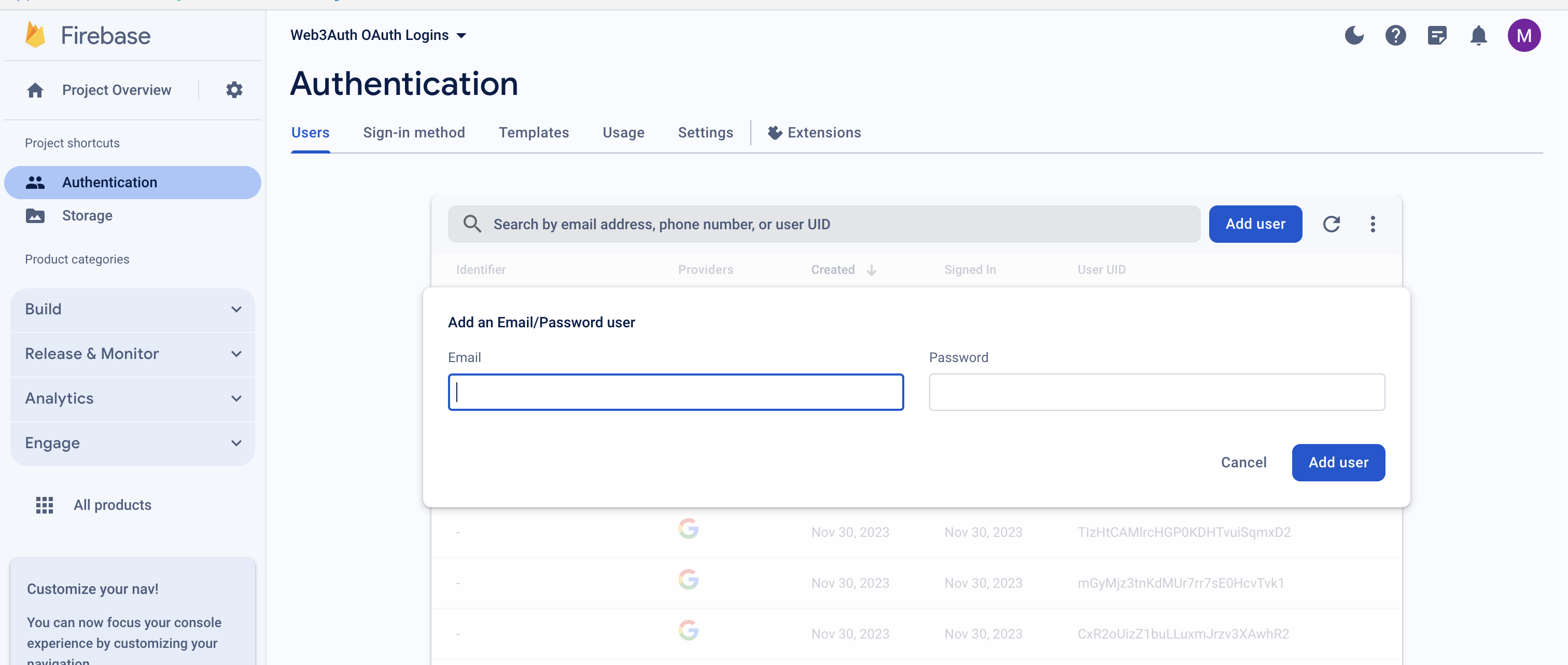
I think Shahbaz meant that in your signIn method that gives you the idToken, it accepts an email and password value. These values seem borrowed from our examples hence it will work with our Firebase configuration because we have set up this email and password as an acceptable set of parameters to login. By any chance have you changed the firebaseConfig to your own but forgot to allow this email and password as a set of acceptable parameter to log in? @kenton
Attaching a screenshot of the page where you need to “Add user” to your firebase console for this login to happen smoothly. Here, add the set of email and password that you want firebase to consider valid.
kenton
November 30, 2023, 10:36pm
17
@maharshi Oh yes, sorry. The way it was worded through me off. Yes, I have set up the user in firebase and I can see that I’m authenticating into firebase successfully. After I am successfully authed, I am redirected to the web3 signin, that’s where the error is happening.
Archived Content from Web3Auth Community