Archived Content from Web3Auth Community
This topic was originally posted by manimohanrn on 9/4/2025.
This content has been migrated from our previous community forum to preserve valuable discussions.
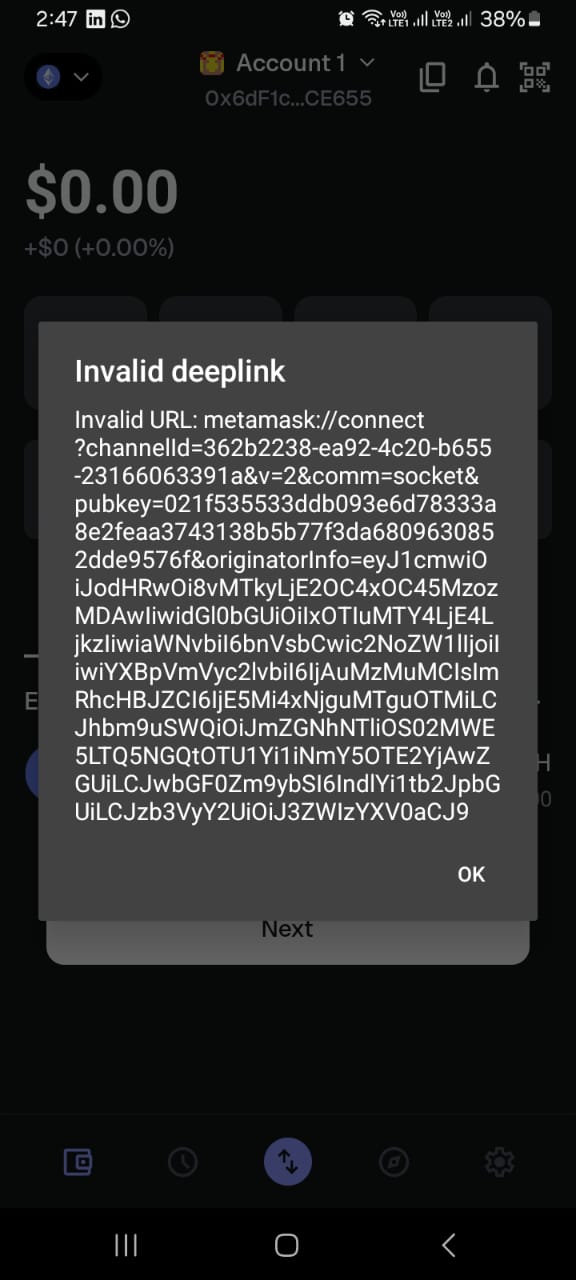
Thanks for sharing the details and the screenshot! I see you’re experiencing an issue where Web3Auth works on desktop browsers but not on mobile browsers when using the PnP Web SDK with Next.js page routes.
Here’s a summary of your issue for the support team:
Issue Summary
- SDK: Web3Auth Plug and Play (PnP) Web SDK
- Framework: Next.js (using page routes)
- Platform: Works on desktop browsers, fails on mobile browsers
- Error Evidence: Screenshot provided
- Integration Context: Using Web3Auth with Next.js, encountering issues specifically on mobile browsers
Next Steps & Information Needed
To help the support team debug this faster, could you please provide:
-
Web3Auth Initialization & Login Code:
Please share the code snippets where you initialize and invoke the Web3Auth login in your Next.js app. This helps us check if there are any mobile-specific configurations missing. -
SDK Version Number:
Which version of the PnP Web SDK are you using? (e.g.,@web3auth/modalversion) -
Mobile Browser Details:
Which mobile browsers (and versions) have you tested? Is the issue present on both iOS and Android? -
Console Logs or Errors:
If possible, open the browser console on your mobile device (or use remote debugging tools) and share any error messages you see when trying to log in.
Common Troubleshooting Steps
- Mobile Support: Ensure you are using the Web3Auth Modal SDK which is designed for both desktop and mobile browsers.
- Next.js Routing: If you are using custom routes or server-side rendering, make sure the SDK is only initialized on the client side, as it requires a browser environment.
- Redirect URLs: Double-check that your redirect URLs are correctly set up for mobile browsers, as some mobile browsers handle redirects differently.
For more details, check the Web3Auth Next.js Quick Start Guide and the Integration Checklist.
Once you provide the code snippets and the above details, the support team will be able to assist you further! Thank you for your patience.
Note: This response was generated by an AI bot and may require further verification. The Web3Auth support team has tracked this issue and will be responding as soon as possible.
Additionally, we would recommend you to join our biweekly Office Hours to get this resolved even faster. Web3Auth Developer Office Hours
This is an issue on the metamask sdk side. On mobile browsers the dapp tries to open metamask app on the mobile.
Will let you know once it’s resolved.
1 Like
When connecting MetaMask to the mobile app, it disconnects after refreshing the browser and shows an alert popup. How can I fix this issue? I will attach a screenshot.
Next Js Page router


This issue has been resolved. Please upgrade to the latest web3auth SDK.